Welcome to SEC520 - Internet Security
Quick Links
| Weekly Schedule | Course Outline | Course Policies | Security Resources | Security Community | Instructor Resource |
|---|
Assignments
| Assignment 1 | Assignment 2 |
|---|
What This Course is About
This subject explores issues surrounding web site construction, operation, and maintenance from a security point of view. Students will learn how to:
- List basic rules regarding Internet Security.
- Identify attack types from both internal and external sources.
- Conduct safe authorized Penetration Testing (creating and using Virtual Machines).
- Build secure servers from Penetration Testing Results ("hardened" servers).
Major topics will include document encryption, server protection, and defense strategies.
Demonstration web servers for both Windows and Unix/Linux will be investigated during this one semester course.
Course Resources
- SEC520 Weekly Schedule (Course Notes / Labs)
- Course Outline
- Course Policies
Supplies Checklist (Required Prior to First Class)
Hardware
| Item | Item Details | Graphic |
|---|---|---|
| SATA Hard Disk in Removable Drive Tray | There are a few different methods of setting up for the SEC520 lab: | 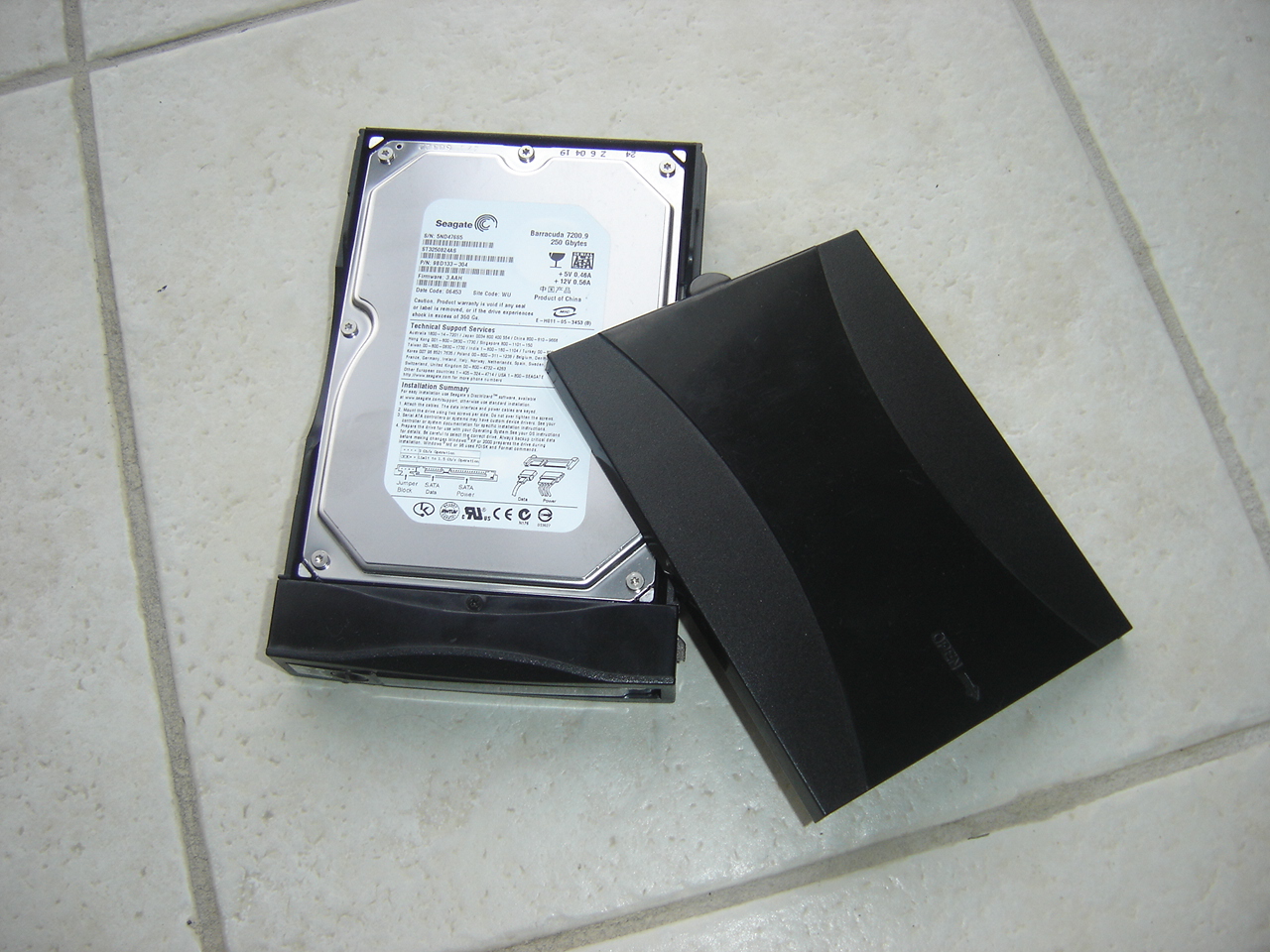 |
| 1. Use removable SATA/SSD Removable Hard Disk (Kali Linux host, VMs for other vulnerable OS | Hard Disk in Disk Tray At least 160 GB (available at the Bookstore) | |
| 2. Setup VirtualBox on existing Notebook/Netbook, and create VMs for Kali Linux, vulnerable Windows (TBD) server, and vulnerable Linux server | ||
| 3. Full dedicated install on a Notebook/Netbook for Kali Linux, VMs to be installed for other vulnerable OS | ||
| Specification for SATA/SSD Hard Disk in Removable Drive Tray: | ||
| - Hard Disk Size: at least 160GB (250 - 500 GB preferred). Please buy the tray from ACS or the bookstore as not all trays are compatible. | ||
| - Mechanical shock from dropping a hard drive causes drive failure for several students each semester. If you use a mechanical hard drive, be careful not to drop it, and transport it in a padded container (e.g., a neoprene netbook sleeve, available from some dollar stores). | ||
| - Solid state disks (SSDs) are becoming competitive in price, are faster, and are less susceptible to shock, so you may want to look for a deal on an SSD instead of a hard drive -- but check to ensure that your SSD will fit properly into your drive tray. | ||
| - Please tighten the drive screws securely to prevent the tray from jamming in the holder, or leave the screws off. |
Bootable Operating System Images
Note: Although instructions are provided to burn OS for VMs on CD/DVD, there are other methods of installing OS on VMs: USB stick, network install, or by downloaded image file. You can determine the best method to use. Here is a link to installing a VM from saved image file: How to Run ISO Image File in VirtualBox
| Storage Media | Download and Burning Options |
|---|---|
| Kali Linux CD: | USB keys to Installation Media (Alternative to CD/DVD) |
| - Download URL (Select for appropriate machine 32/64-bit): http://www.kali.org/downloads/ | |
| - Download and Burn Image in TEL Open Lab | |
| Fedora Core 7 or Centos 7 DVD: | |
| - Download URL: http://dl.fedoraproject.org/pub/archive/fedora/linux/core/5/i386/iso/FC-5-i386-DVD.iso | |
| - Download and Burn Image in TEL Open Lab |
Study Aids
| Item | Item Details | Graphic |
|---|---|---|
| Lab Log-Book | Download and Print: SEC520 Lab log book [PDF] [odt]. |  |
| Please note that you can use your log book during quizzes, written tests, practical tests and the final exam. | Lab Log-Book: Used for marking labs and for an evaluation aid | |
| It's also the record that you have completed the labs, so don't lose it! |
Important Information
You are Playing With Fire!
"A little bit of knowledge is a dangerous thing". You MUST carefully read and follow instructions in your SEC520 labs as well as heeding warning from your SEC520 instructor. Failing to use caution when learning in this environment can cause damage to computer systems and cause your computer account(s) to be taken away.
Students will be required to "sign waivers" to promise to follow these rules carefully, and only perform certain operations in the computer lab indicated at the college.
Share / Collaborate Problems and Solutions with Others (non-evaluation issues only)
Use the "lounge" section is Moodle to post concerns or solutions with other classmates regarding labs. The ability to collaborate with colleagues to solve problems instead of always asking your boss (or professor) is a very useful skill-set!
Place your Full Name and Contact Information on the hard disk tray cover and directly on the disk drive.
Use an adhesive label and permanent marker, or a white marker on the black cover.
Always "double-check" that you have removabled your hard disk tray prior to exiting the lab room.
You may have your hard drive tray stolen which will result in lost work!
Do not share your SEC520 disk drive with another course.
The work you do in this course will render your other work inaccessible and may erase it.
Earlier labs become the foundation for later labs.
Seemingly "small errors", or "skipping instructions" in earlier labs can have negative consequences when performing other dependent labs. Make backups when requested at the end of labs for "restoration points" in case something goes wrong while performing a lab.
Always shut down your system under software control, rather than using the reset or power buttons. You can shutdown using the GUI or with the poweroff, reboot, init, or shutdown commands. Shut down your virtual machines before shutting down your main system.
Course Faculty
During the Winter 2018 semester, SEC520 is taught by:
Anthony Austin anthony.austin@senecacollege.ca
x32267, Rm. D2096 (formerly TEL)