Assignment 1
The purpose of the OSL740 assignments is to showcase your abilities in the course thus far, and conduct a bit of independent research. Some of what you'll be asked to complete will be familiar to you, while other parts will require you to think a bit and do some light online research. It's expected you won't have all the answers right away, but you can find them. As a result, unlike labs, your professor cannot provide any help or troubleshooting for your assignment.
Weight: 15% of your overall grade
Due Date: Refer to your section's Blackboard announcements.
Create a new virtual machine
Create a new Ubuntu 22.04 Desktop VM (Normal installation) as a nested VM in KVM, using the following information. You may refer to your lab instructions, logbook and google for any of the steps. The installation process is the similar to deb1 in Lab 2. When asked for partition information, use the defaults.
- Install a new Ubuntu VM.
- The virtual machine name and the internal hostname for the machine must include your Seneca username in the following format (example: jmcarman-ubuntu)
- The regular user created during installation must also be your Seneca username (example: jmcarman).
- Ensure LVM is used in your installation partitioning.
- Memory: 2048 MB
- Disk space: 15 GB
- CPUs: 2
- Use your existing virtual network
- Select Minimal Installation on the Updates and other software screen
- Use the default selections on the Installation type screen.
The rest of this assignment should be done after the installation is completed successfully.
Post Installation Tasks
Use apt to accomplish the following:
- Find and install the Cinnamon desktop environment:
apt install cinnamon - Do the rest of the assignment (including the assignment submission) while running Cinnamon.
- Update the system
- Use systemctl to confirm the default firewall is running (Hint: the default firewall in Ubuntu is ufw)
- Use
aptto installChromium. You may need to use Google to accomplish this.
Adding Users with a default home directory structure
Look at the useradd man page to figure out how to create a default home directory structure for new users (hint: look at the -m & -k options). You will need to uncomment the skel variable in the useradd default values file.
Create the following default home directory structure for new users:
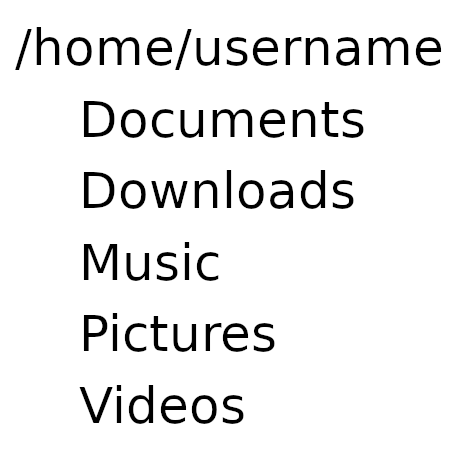
Create the following users, with the appropriate names. Don't forget to assign them a default password for security purposes.
| Username | Full Name |
|---|---|
| tstark | Tony Stark |
| bbanner | Bruce Banner |
| thor | Thor Odinson |
| srogers | Steve Rogers |
| nromanoff | Natasha Romanoff |
Create the group avengers and add the users you created to the avengers group.
Issue the following commands and take screenshots of the output for your submission
sudo tail -6 /etc/passwd
sudo tail -6 /etc/group
Install a Second Linux Distribution as a Virtual Machine
Create a new Linux Mint VM (Cinnamon Edition) in KVM as a nested virtual machine, using the following information. Use the default partitioning and installation options.
- VM name & Hostname: youruser-mint (Example: jmcarman-mint)
- Username: Your Seneca Username
- Memory: 2048 MB
- Disk space: 20 GB
- CPUs: 2
- The virtual machine name and the internal hostname for the machine must include your Seneca username in the following format (example: jmcarman-mint)
- Install Linux Mint as the OS for the new virtual machine .
- Use the defaults for anything not specified.
Post Installation Tasks
- Update the system using
apt. - Use
aptto installChromium. You may need to use Google to accomplish this.
Submission
Submit the following screenshots on BlackBoard that show you've completed the work.
Ubuntu VM
- Ubuntu VM installed
- Output of the hostname command
- Cinnamon desktop installed and in use
- Chromium installed
- Users and group created, users added to the
avengersgroup
Linux Mint VM
- Linux Mint VM installed
- Output of the hostname command
- Chromium installed
Rubric
| Task | Maximum mark | Actual mark |
|---|---|---|
| New Ubuntu VM installed (Seneca username) | 5 | |
| Correct hostname (Seneca username) | 2 | |
| Using Cinnamon | 2 | |
| Chromium installed in Ubuntu VM | 2 | |
| Linux Mint VM installed | 5 | |
| Correct hostname (Seneca username) | 2 | |
| Chromium installed in Mint VM | 2 | |
| Users created and added to the avengers group (on Ubuntu VM) | 5 | |
| Total | 25 |