Assignment 1
Overview
In this assignment, you will use what you have learned in Labs 1-3 to add another router and client machine to your existing network to look like the diagram below:
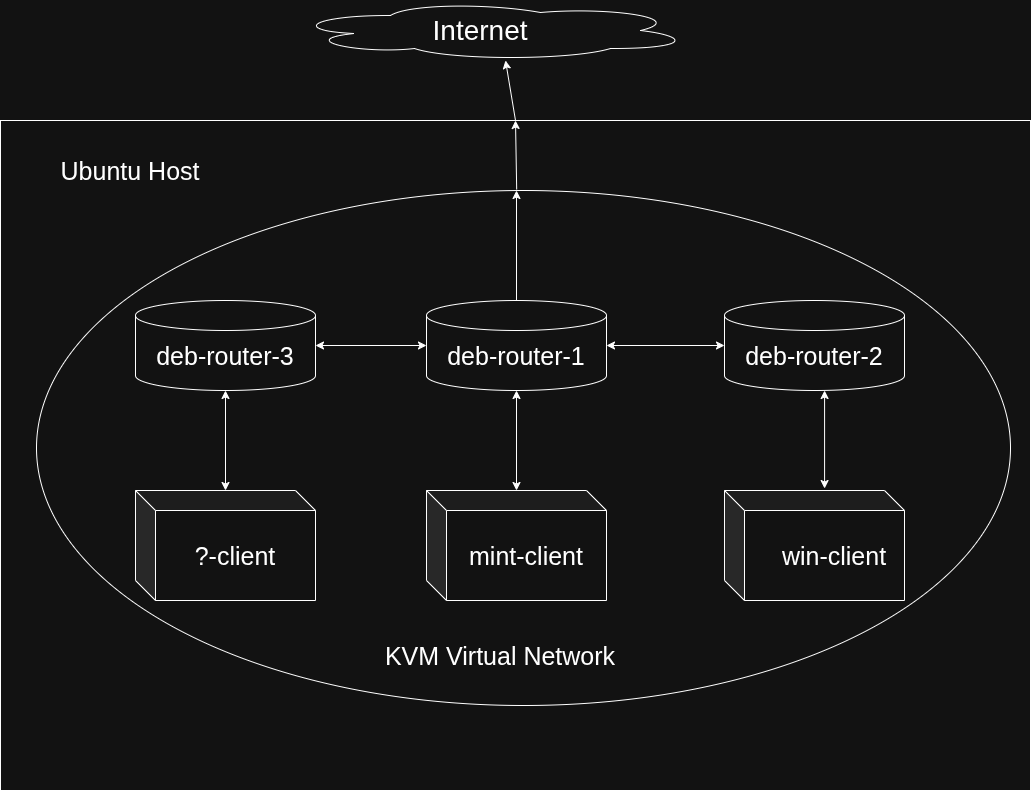
Tasks that must be completed:
- Install a third router using the same Debian OS that you used for deb-router-1 and deb-router-2. This router will be called "deb-router-3".
- You will also install a new client VM with a distro of your choosing. You cannot use Ubuntu, Mint, or Debian. It is recommended you choose something lightweight so you don't have to allocate too many resources to it. You will name it "name-client", replacing name with the actual name of the distro.
- You will connect deb-router-3 to your existing network, per the network diagram above.
- The network between deb-router-3 and deb-router-1 will be named "backbone2" and you will use 192.168.200.0/24 to address the devices on it.
- deb-router-1 will have 192.168.200.11/24 and deb-router-3 will have 192.168.200.12/24
- The network between deb-router-3 and your new client VM will be named "cn3" and you will use 192.168.175.0/24 to address the devices on it.
- deb-router-3 will have 192.168.175.11/24 and your new client VM will have 192.168.175.12/24
- deb-router-3 and your new client VM must NOT be connected to the host system
- Your new client VM will only be connected to deb-router-3 and deb-router-3 will only be connected to your new client VM and deb-router-1.
- FRR/OSPF will be installed and configured correctly on deb-router-3 to allow full interconnectivity between your new client VM, deb-router-3, all the other VMs on your network, and the Internet. You will also have to update the entries for FRR/OSPF on deb-router-1 and deb-router-2.
- All of the necessary DNS configurations will be added to deb-router-1 to allow for your new devices to send queries to deb-router-1 and institute the following mappings:
- 192.168.200.11 > deb-router-1.ops345.org
- 192.168.200.12 > deb-router-3.ops345.org
- 192.168.175.11 > deb-router-3.cnet3.ops345.org
- 192.168.175.12 > name-client.cnet3.ops345.org
- Replace "name" with the name of the distro you chose to use as noted in step 2.
- Change deb-router-3 and your new client VM's configurations so that they both look to deb-router-1 for all DNS queries
Submission
You will create a submission document that will be uploaded to the Assignment 1 submission page on blackboard by the due date. Late submissions will receive a penalty of 25% per day.
The document must include the following screenshots:
- The IP address for all NICs on deb-router-1, deb-router-3, and your new client VM. The easiest way to show this is with the output of:
ip address show
- The output for the following two commands in the FRR console on deb-router-1 and deb-router-3:
show ip ospf neighbor
show ip route ospf
- The contents of all DNS configuration files on deb-router-1 (named.conf.options, named.conf.local, all forward and reverse lookup zone files)
- The DNS configuration for deb-router-3 and your new client VM (showing that they are looking to deb-router-1 for all DNS queries)
- A successful ping from deb-router-3 to deb-router-2 using an IP address
- A successful ping from deb-router-2 to deb-router-3 using a FQDN
- A successful ping from your new client VM to mint-client using an IP address
- A successful ping from mint-client to your new client VM using a FQDN
- A successful ping from your new client VM to google.com
All screenshots must show your username in the terminal of the VM you are showing. Failure to do so will result in lost marks. Please ensure your submission document is clean and easy to read. All screenshots should include a label explaining what it is showing.
Assignment 1 Tips
- Don't forget about the IP forward configuration on deb-router-3 (this must be done before FRR/OSPF is installed)
- You can get FRR/OSPF installed on deb-router-3 before your disconnect it from the host system or you can use the method we used near the end of Lab 2 to get it installed on deb-router-2 if you forget to do so before you disconnected it from the host system.
- Marks will be deducted if deb-router-3 and your new client VM are not disconnected from the host system
- Per the instructions, you are not creating a new domain for the new 192.168.200.0/24 network. However, you are creating a new subdomain for the 192.168.175.0/24 network. Think critically about what this means for your new DNS configurations on deb-router-1, especially when it comes to the forward and reverse lookup zones.
- There are several small configurations needed to get everything working. It is recommended you keep a running list of what you have completed and what you did to complete it while you work on this assignment in case you need to go back and fix something (these notes will also be useful on the midterm and final). That said, sometimes the fastest way to deal with something not working the way it should is to simply delete the VM and install it fresh.
- Everything you need to complete this assignment was done in the labs. You just have to apply those concepts to two new VMs and update your configurations on deb-router-1. No external information is needed. DO NOT USE AI FOR THIS ASSIGNMENT. AI will not know or understand the context in which these tasks are being completed and may give you configurations that will interfere with your end goals.
- Your teacher may ask you to show them your configurations in class. If it is discovered that you used AI to complete anything in this assignment, a mark of 0 will be assigned for Assignment 1.
Rubric
Assignment 1 is worth 20% of your Final Grade. Your submission will be graded according to the following criteria:
| Criteria | Mark |
|---|---|
| Correct IP configurations | 3 |
| Correct FRR/OPSF configuration | 6 |
| Correct DNS configuration | 6 |
| Successful Pings | 5 |
| Total | 20 |